Find the booking by looking at which bookings are accepted or by the date. If you found the booking, click on the small pen symbol on the right.
Please note that any changes to a booking have implications please refer to our Terms and Conditions.
Step 2:
If you scroll down you will see a date and a time, here you can change it to the new time.
Step 3:
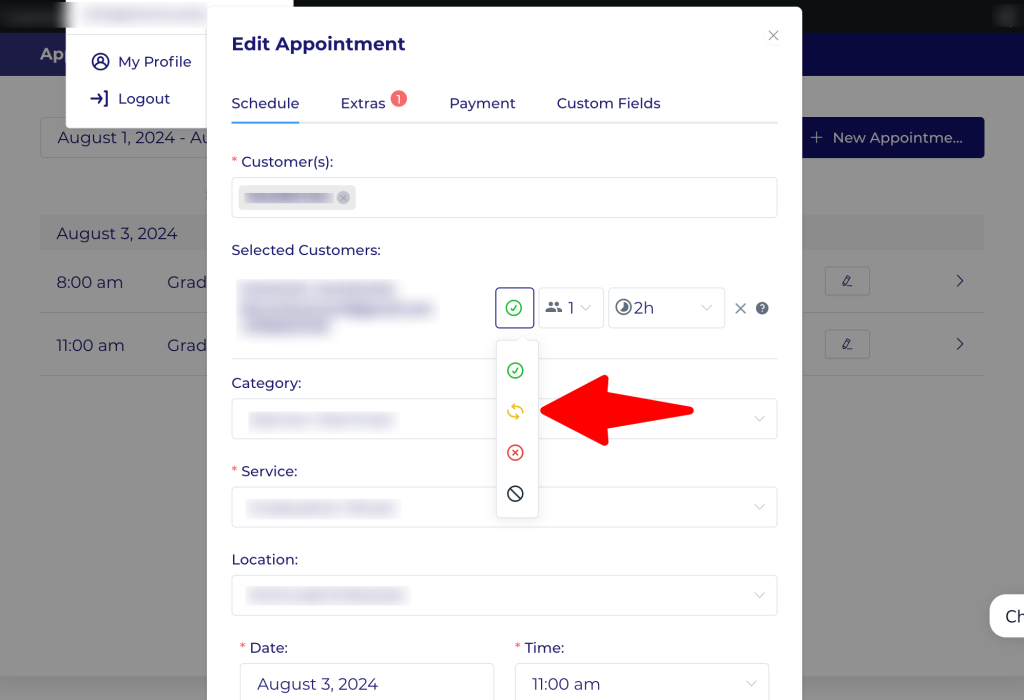
Now you need to scroll up and click on the green/yellow icon.
Step 4:
You need to set this to pending if it is not yet as a new invoice needs to be generated by DWH Marketing and we will let you know when you can accept the new booking.
Step 5:
Go down and save your work.
Please also note that if the window does not close after saving the has been an error, close your browser, clear your cookies and history. Then log back in and redo from step 1.