Position your cursor over the “Hire A Photographer” tab in the navigation menu. A dropdown list will appear, displaying all the cities where our services are available. Select your city to proceed.
Step 2:
Now, a comprehensive list of photographers in your selected area will be displayed. Feel free to browse through the profiles to find a photographer that suits your needs.
Step 3:
Click on the “Book Me” button under any photographer’s profile to explore their offerings in detail. When you’re ready to book, scroll to the bottom of the selected photographer’s page and choose the service you’d like to book.
Step 4:
Next, you’ll need to answer a question that appears, which varies depending on the service selected. For example, you might be asked, “How many people do you want to include in your photoshoot?” This helps tailor the experience to your needs.
Step 5:
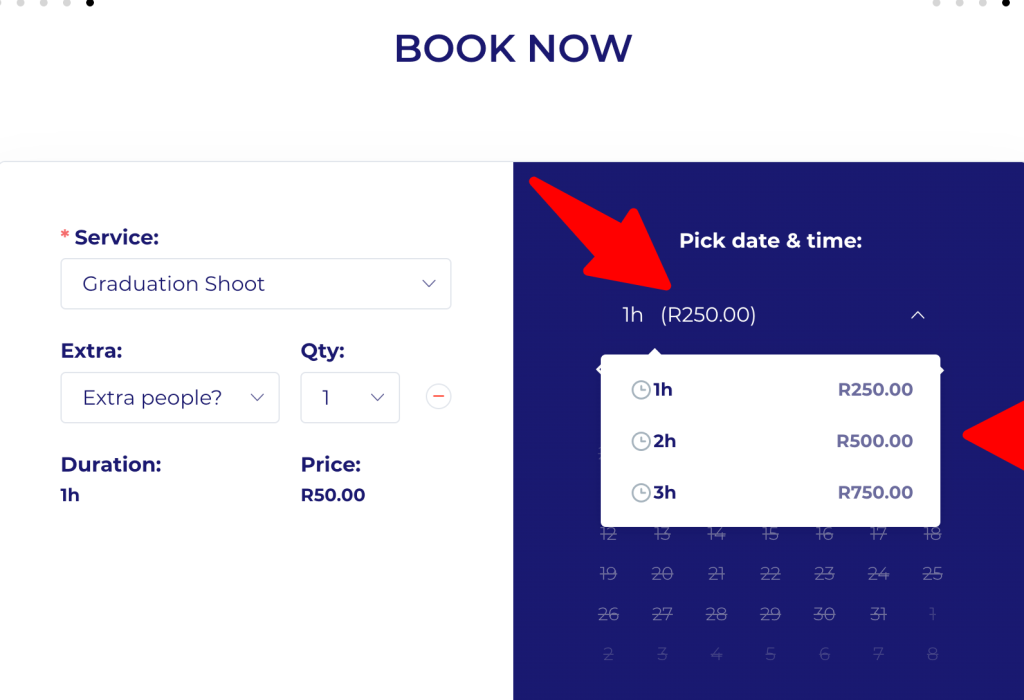
Next, you can select the amount of hours you want to book.
Step 6:
Next, a calendar will pop up, allowing you to select your preferred date and time for the photoshoot. Once you have made your choice, click on “Continue” to proceed.
Step 7:
In this section, please fill in all your details, including your NAME, SURNAME, EMAIL, PHONE NUMBER, and PLACE OF PHOTOSHOOT. After entering the information, click “Continue” to move forward.
Step 8:
Now, you’ll see your cart displaying the selected items. If everything looks correct, proceed to the next page by clicking “Continue.”
Step 9:
Now, the checkout page will be displayed. Please fill in all the requested information in this section, and once you’ve verified that everything is correct, click on “Pay Now” to complete your transaction.
Step 10:
After clicking “Pay Now,” you will be redirected to Payfast to complete your purchase. First, select your payment method from the list of available options. Then, fill in your banking details. Once you’ve entered all the necessary information, click “Pay Now” to finalize your transaction.
Step 11:
If your payment is successful, you will be redirected back to our website, where your booking confirmation will be displayed. This confirmation page will include all the details of your booking for your reference.